Your content,
beautifully played.
Kraid IPTV is a fast, elegant and 100% private media player. Connect your own M3U playlist or Xtream Codes account and enjoy your content on phone, tablet and TV — no ads, no tracking, no monthly fees.
7-day free trial. Then a single 4.99 € payment — forever.
No account · No card · 14 MB download
Sound familiar?
Everything you hate about IPTV players, fixed
We built Kraid around the three complaints every IPTV user knows by heart.
Endless buffering
Freezes at the best moment, reconnects, spins again. Kraid's native engine tunes channels with a smart buffer that adapts to your network.
Washed-out image
Your provider streams 4K but your player shows soup. Kraid decodes HEVC/H.265 in hardware: pixel-perfect quality without draining the battery.
Clunky, confusing apps
Endless menus, ugly grids, settings mazes. Kraid sets up in two steps and organises channels, movies, series and guide automatically.
Features
Everything a serious player should have
A native video engine with hardware decoding, built to zap fast and look stunning on any screen.
Smooth live TV, up to 4K
Hardware HEVC/H.265, instant channel switching, HLS or MPEG-TS at your choice.
DVR recording
Record what you're watching or schedule a future program and let Kraid do the rest.
Program guide (EPG)
Now & next at a glance, reminders, and scheduling straight from the guide.
Movies & series library
Your VOD catalogue organised with posters, details and episodes — also from M3U lists.
Formats & aspect control
HLS ↔ MPEG-TS switching and standard aspect modes: original, fill, crop, 16:9, 4:3.
All your devices
One licence covers 3 devices: phone, tablet, Fire TV or Android TV. Plus screen casting.
Audio & subtitles
Pick the audio track and subtitles you want, right from the player.
100% private
Zero telemetry, zero ads, zero accounts. Your data never leaves your device.
Catch-up TV
Rewind the guide and play programmes that already aired, when your provider supports it.
Picture-in-Picture
Keep watching in a floating window while you use other apps on your phone or TV.
Sleep timer
Set 30, 60, 90 or 120 minutes and Kraid stops on its own — ideal for falling asleep.
Organise your lists
Hide the categories you never watch and keep favourites on top, on every device.
Timeshift on live TV
Pause and rewind live TV. Off by default; turn it on in Settings and choose from 1 to 30 minutes.
Parental control by category
Set a PIN and pick exactly which categories disappear behind it. Peace of mind on the family TV.
Picture adjustments
Brightness, contrast and saturation right in the player — fix a washed-out channel without touching your TV settings.
Program reminders
Set a reminder from the guide and Kraid brings you to the channel when the show starts.
Open in an external player
Hand any stream to VLC or MX Player in one tap. An escape valve for the most stubborn channel.
Export and import settings
Save playlists, favorites and preferences to a file and restore them on your next device in seconds.
Chromecast
Send any channel, movie or episode to a Chromecast or a Google TV in the room next door.
Stalker / MAG portals
The third playlist format, beyond M3U and Xtream. Connect with your portal URL and MAC address — many providers offer nothing else.
Frame-rate detection
Kraid measures the real frame rate of each channel and compares it with your screen, so you know when 25 fps on a 60 Hz panel is what causes the judder.
Hardware acceleration
Video is decoded on the graphics card, so live TV stays smooth and your processor stays free. You can turn it off from Settings if a driver misbehaves.
It recovers on its own
If the signal drops, Kraid keeps retrying with spaced-out attempts until it comes back — instead of leaving you staring at a frozen picture.
Scheduled recording
Record what you are watching, schedule a programme straight from the guide, or set a start and end time. You choose the folder.
Subtitles your way
Size, colour, and background — shadow, outline or box. Because the default subtitle is too small on a television and too intrusive on a phone.
Gesture controls
Swipe for brightness and volume, drag to seek. On the phone, everything is where your thumb already is.
Engine & network
The part other players don't let you touch
Most IPTV apps ship one fixed video engine: if a channel won't open, that's the end of it. Kraid gives you three, and lets you switch in a tap.
Three playback engines
System uses your GPU's decoder. FFmpeg remuxes locally and opens TS, HLS, MKV, AVI, AC3/EAC3 and HEVC. Buffered adds a real anti-stutter cushion. A channel that fails on one usually plays on another.
Unique to KraidAnti-stutter buffer up to 20 s
Not a vague promise: you choose 1, 3, 10 or 20 real seconds of video held in advance. On an unstable connection it is the difference between watching and reloading.
1s · 3s · 10s · 20sAutomatic reconnection
If your network blinks, Kraid retries on its own until the signal is back, without losing your place or dropping you back to the channel list.
Retries until the signal is backDisguisable User-Agent
Some panels only serve requests from known IPTV apps. Kraid can identify itself as Smarters, VLC or TiviMate so those lists work instead of failing.
Smarters · VLC · TiviMateEPG time offset
Watching channels from another country? Shift the guide's clock by whole hours until it matches the broadcast exactly.
Per playlistBasic and Advanced modes
Settings open in Basic: four choices, nothing to break. Switch to Advanced only when you want the engine, buffer and network controls.
No settings mazeEvery one of these controls lives in Settings — no config files, no hidden menus, no support ticket.
Pause live TV
Rewind live TV up to 30 minutes
The doorbell rings mid-match. Hit pause. With timeshift on, Kraid keeps the live signal in a local buffer, so you come back exactly where you left it — and jump to the live edge with one button.
Timeshift is off by default and you turn it on in Settings › Advanced, choosing how much to keep (1 to 30 minutes). It is local, so it needs nothing from your provider — unlike catch-up, which reaches much further back but depends on them.
Timeshift is available on Windows PC. The Android and Smart TV apps do not offer it yet.
Pause the live signal
Press pause on live TV and the stream keeps flowing into a local buffer instead of being thrown away.
Rewind and replay
Scrub back through the window you chose to see that goal, that line of dialogue, that number on screen again.
One tap back to live
A LIVE button jumps you straight back to the broadcast edge whenever you want to catch up.
Multi-view
Don’t choose. Watch it all.
Watching two channels from a one-connection account gets you a 403 error in every other player, with no explanation. Kraid counts the connections each playlist allows and tells you, in plain words, before you hit the wall.
Up to 4 live channels
A mosaic of up to four streams with audio switching between them — the whole match day on one screen.
Connection budget per playlist
Tell Kraid how many simultaneous streams each account allows. It never opens more than that, so the provider never rejects you.
Combines several playlists
Three one-connection accounts? Three windows — each one uses a different playlist's session. Kraid works it out for you.
Clear reasons, not error codes
When a channel can't be added you're told why — “this playlist has no free connections” — instead of a silent failure.
Multi-view is available on Windows PC and Android. On Smart TV it is not offered: those panels do not guarantee several simultaneous decoders.
Your lists, your order
Thousands of channels, tamed
Providers hand you an unusable wall of channels. Kraid gives you the tools to cut it down to the ten you actually watch.
Hide channel by channel
Not just categories: hide individual channels you never open and never see them again.
Pin your groups to the top
Pin the categories you use daily and reorder them freely. Sports first, shopping last — or gone.
Favorites always first
Mark a favorite once and it stays at the top of every screen, on every one of your devices.
Reset whenever you want
Changed your mind? One tap restores the provider's original order without re-syncing anything.
Multiple playlists
Two providers, one app, zero mess
Combine as many M3U playlists and Xtream accounts as you like. Kraid keeps them apart when you want and merges them when you don't.
Name each playlist
“Main”, “Sports”, “Backup” — give each list a name you recognise instead of a URL you don't.
Active list or all at once
Browse one provider on its own, or everything merged into a single catalogue. Switch in a tap.
Edit without deleting
Your provider changed the password or the server? Edit the list and re-sync — your favorites and settings survive untouched.
Re-sync one at a time
Refresh a single playlist instead of rebuilding your whole catalogue. Faster, and nothing else is disturbed.
ONE LICENCE, EVERY SCREEN
Looks right on every device you own
The same app, adapted to each screen: a remote-first interface on TV, touch on mobile, keyboard and mouse on PC.
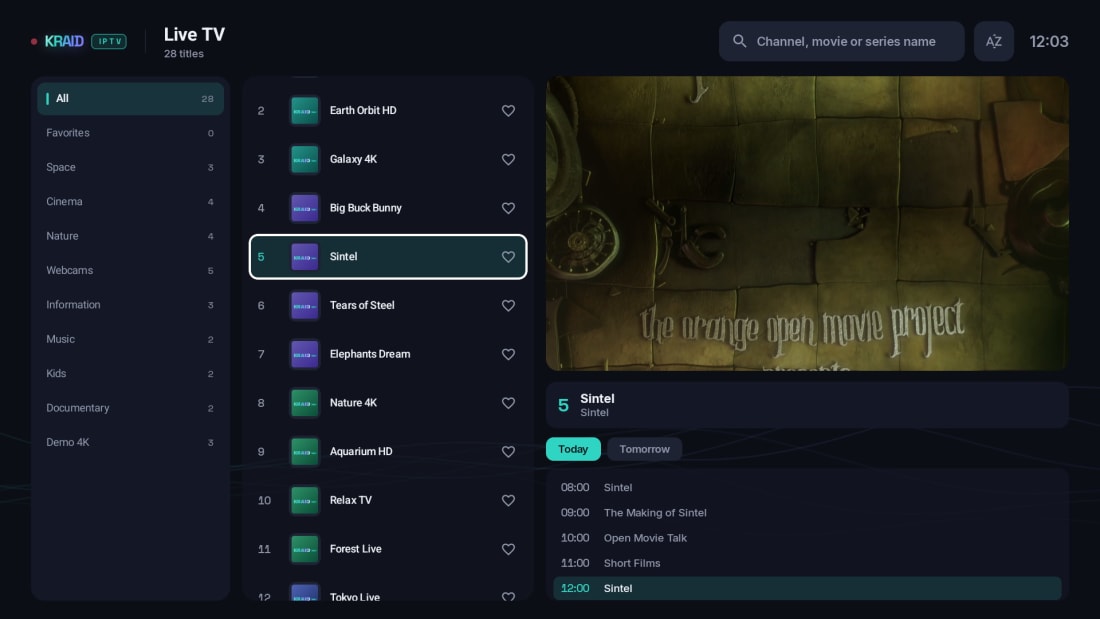
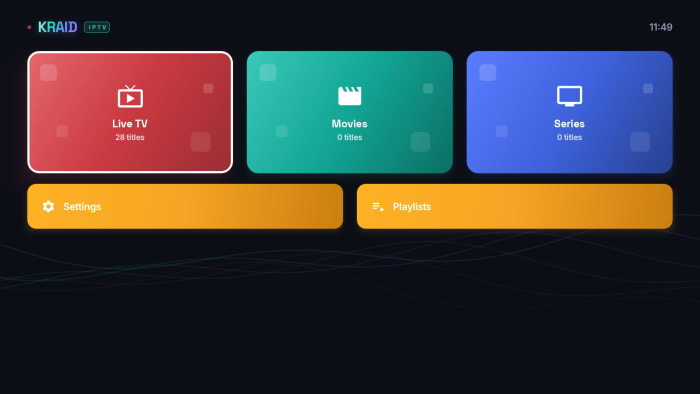

Android · Android TV
One APK for phones, tablets, Android TV and Google TV.
Fire TV · Firestick · Xiaomi Mi Box S
Install in 5 minutes with Downloader, no PC required.
Windows 10 / 11
Installer and portable version, no admin rights needed.
Samsung · LG
Native Samsung Tizen and LG webOS apps, built and tested — arriving in the TV stores.
Why Kraid
Compare before you decide
The features that matter to real IPTV users, side by side.
| KRAID IPTV | Other players on the market | |
|---|---|---|
| Price model | ✓ 4.99 € once, forever | Monthly or yearly fees |
| Devices per license | ✓ 3 included | 1, pay for extras |
| Image quality | ✓ 4K · HEVC · HW | Software decode, stutter |
| Playlist formats | ✓ M3U · Xtream · Stalker/MAG | Usually M3U and Xtream |
| Subtitle styling | ✓ Size, colour and background | Fixed style |
| Catch-up from the guide | ✓ Watch a past show from the EPG | Rarely, or hidden away |
| Automatic reconnection | ✓ Keeps retrying until it returns | Freezes or kicks you out |
| Disguisable User-Agent | ✓ Smarters, VLC or TiviMate | Fixed: the list just fails |
| Back up your setup | ✓ Export and import in one file | Start from scratch each time |
| Playback engines | ✓ 3, switchable | 1, fixed |
| Anti-stutter buffer | ✓ Up to 20 s, adjustable | Fixed or none |
| Timeshift on live TV | ✓ Up to 30 min, no provider needed | Provider-dependent or none |
| Multi-view | ✓ 4 channels + connection budget | Rarely, without limit control |
| Parental control by category | ✓ PIN, per category | Rare or global only |
| Recording (DVR) | ✓ Included + scheduled | Paid add-on or missing |
| Ads · telemetry | ✓ 0 · 0 | Ads and trackers |
| Setup | ✓ 2 steps, auto-sorted | Manual and confusing |
| Languages | ✓ 20 | A handful |
| Multi-view & continue watching | ✓ Built in | Rarely |
| Movie & series pages | ✓ Automatic, with trailers | Plain lists |
| TV, phone & PC | ✓ One license, synced | Separate apps or fees |
| Refund guarantee | ✓ 30 days, no questions | Usually none |
Generic comparison with commonly available IPTV players; features vary by product.
TRY IT RIGHT HERE
Zap through channels without installing anything
A working replica of the Live TV screen. Use the arrow keys, type a channel number or just click — exactly like you would with a remote.
20 titles --:--
All channels TodayTomorrow−1h+1h --:--
24 titles --:--
24 titles --:--
—
Playlists
Demo built with royalty-free clips. The real app plays your own M3U or Xtream sources.
DO THE MATH
How much do you save with a one-time payment?
Most IPTV players charge every year. Kraid charges once. Move the slider and see the difference over time.
Estimate based on publicly listed prices of common IPTV players (August 2026): ~€39.99/year subscription and ~€31.99 one-off lifetime. Kraid: €4.99 once, updates included.
You save with Kraid
Pay once. Watch everywhere.
Your license key activates up to 3 devices — phone, TV and computer. No subscriptions, no renewals, no per-device charges.
One key, three devices, zero recurring payments. Replace a device? Free its slot at any time.
What's new
New in Kraid — already on your screens
Every update is free forever with your lifetime license. These are the latest additions, already live in the app.
Continue watching — every movie and episode waits exactly where you left it.
Multi-view
Watch up to 4 live channels at the same time and switch the audio between them.
Continue watching
Movies and episodes resume exactly where you stopped, right from the home screen.
Scheduled DVR recording
Record what you're watching or schedule a future show from the guide — Kraid records it for you.
Rich movie & series pages
Ratings, synopsis, cast and trailers, added automatically to your library.
Favorites on every screen
Mark a favorite on your phone and find it waiting on your TV and computer.
Timeshift on live TV
Pause and rewind live TV, choosing how much to keep — from 1 to 30 minutes.
One 4.99 € payment. All of this — and everything still to come — is included.
How it works
Ready in two minutes
Kraid ships with no content. You connect your own sources and it turns them into a premium experience.
Download & install
Get the APK on your Android, Fire TV or Android TV. No sign-ups, no accounts.
Add your playlist
Enter your M3U playlist URL or the Xtream Codes credentials from your provider.
Enjoy
Channels, movies and series organised instantly, with guide and recording.
Download
Get Kraid on all your screens
One licence covers up to 3 devices. Download, install and enjoy your 7-day free trial — no sign-up needed.
Android
Phones, tablets and Android TV / Google TV sets (TCL, Sony, Philips…). One universal APK.
Recommended: automatic updates and verified install.
Enable “install from unknown sources” and open the APK.
 Scan to install on your phone
 Windows PC
Windows 10/11. Installer or portable — your choice.
SmartScreen may warn on first run: choose “More info → Run anyway”.
Step-by-step guide →Fire TV · Firestick · Xiaomi Mi Box S
Same APK, installed with the free Downloader app.
- Settings → My Fire TV → Developer options → allow apps from unknown sources for Downloader.
- Install the free “Downloader” app from the Amazon store.
- Open Downloader and enter this URL:
kraidiptv.com/kraidiptv.apk
Samsung · LG
Samsung Tizen · LG webOS
Coming soonThe native app is finished and in TV store review. Meanwhile, a Fire TV Stick or an Android TV box gives you the full Kraid experience on that same television.
See status and how to watch today →Pricing
One payment. Forever.
No subscriptions, no hidden fees. Try everything free for 7 days, then decide.
What happens after you pay
- Your license key arrives by email, instantly
- Open Kraid and paste it on the activation screen
- Done — up to 3 devices, forever
7-day free trial
one-time payment · no subscription
Others: 30–60 € a year. Kraid: 4.99 € — once.
- Every feature included
- Up to 3 devices
- Updates included
- Instant activation by email
- 30-day money-back guarantee
Secure payment via Stripe · Key by email instantly · 30-day money-back guarantee
FAQ
Common questions
Does Kraid IPTV include channels, movies or series?
No. Kraid is an empty player: it includes, sells and links no content whatsoever. It plays the sources you provide — just like VLC or a web browser. You are solely responsible for ensuring your sources are legal in your country.
Do I need a subscription to use Kraid IPTV?
No. Kraid costs a single 4.99 € payment after the 7-day free trial. No monthly fees — every feature and all future updates are included, on up to 3 devices.
Which devices does it run on?
Android phones and tablets, Android TV / Google TV (TCL, Sony, Philips, Xiaomi…), Fire TV / Firestick and Windows 10/11 PCs (installer or portable) — available today. Native Samsung Tizen and LG webOS apps are finished and going through the TV store review process. A licence activates on up to 3 devices.
What if something goes wrong after I pay?
Write to soporte@kraidiptv.com and a real person will help you. You are covered by a 30-day money-back guarantee, no questions asked. And remember: the 7-day free trial lets you test everything before paying a cent.
A channel won't open. What can I do?
Change the playback engine in Settings → Advanced. Kraid has three (System, FFmpeg and Buffered) and a stream that fails on one usually plays on another. If it stutters instead of failing, raise the buffer to 10 or 20 seconds. Both take one tap and no reinstall.
Can I pause and rewind live TV?
Yes. On Windows with the Buffered engine, Kraid can keep the live signal in a local buffer: press pause, rewind, and jump back to the live edge with one button. It is off by default — holding that window costs memory — so you turn it on in Settings › Advanced and choose from 1 to 30 minutes. It needs nothing from your provider. Catch-up TV, which reaches back days rather than minutes, does depend on your provider offering it.
Does Kraid work with a Stalker or MAG portal?
Yes. Besides M3U playlists and Xtream Codes accounts, Kraid connects to Stalker portals with your portal URL and MAC address — the format used by MAG set-top boxes, which many providers offer exclusively. Add it like any other list and the channels, movies and series are organised the same way.
What do I need to use it?
An M3U playlist URL or an Xtream Codes account from your legal content provider. Enter it once and Kraid organises channels, movies and series automatically.
Is it legal to use an IPTV player?
Yes. An IPTV player is legal software, just like a web browser or VLC. What matters is the content you access: you must hold the rights or licences for the sources you add. Kraid includes no content and is not affiliated with any provider.
How do I receive my licence after paying?
Right after checkout you'll get an email with your licence key. Open Kraid, paste it on the activation screen and you're done.
What happens when the 7-day trial ends?
The app asks for a licence to continue. Your playlists and settings are kept — activate and everything is exactly where you left it.
Does it work with any M3U playlist or Xtream Codes account?
Yes. Kraid supports standard M3U/M3U8 playlists (URL or local file) and Xtream Codes logins, with XMLTV EPG guide, automatic sorting into channels, movies and series, favourites and multiple playlists.
How do I install Kraid on Fire TV / Firestick?
Install the free Downloader app from the Amazon store, allow apps from unknown sources in the Fire TV settings, and enter kraidiptv.com/kraidiptv.apk. The step-by-step guide is in the Downloads section.
What if I change my phone or TV?
Nothing. Free the old device's slot from the app and activate the new one with the same key — at no extra cost, as often as you need.
Does it work in my country and with my provider?
Yes. Kraid has no geo-blocking: it works wherever your M3U playlist or Xtream Codes account works. And since it includes no content, there are no regional catalogs or restrictions — what you watch depends entirely on your own source.
How many simultaneous connections do I need for Multi-view?
One per window. Multi-view opens up to four channels, and each one uses a connection from its playlist's account. With a one-connection account you can open one window per playlist — Kraid counts them for you and tells you when a list has no free connections, instead of leaving you with an unexplained error.
Can I use several providers at the same time?
Yes. Add as many M3U playlists and Xtream Codes accounts as you want, name each one, and browse them separately or merged into a single catalogue. You can edit a list's credentials without losing your favorites, and re-sync just that one.
Is Kraid available for Samsung and LG Smart TVs?
The native apps for Samsung Tizen and LG webOS are built and tested on real TVs, with the same interface and features as on Android, Fire TV and PC. They are currently going through the TV store review process — follow the Samsung & LG page to be notified the moment they land. In the meantime, an Android TV box or a Fire TV Stick plugged into your Samsung or LG gives you the full Kraid experience today.
Why does the picture judder on some channels?
Because the channel's frame rate does not divide evenly into your screen's refresh rate — 25 fps on a 60 Hz panel is the classic case, and it shows up as stutter on camera pans. Kraid measures the real frame rate of each channel and compares it with your display so you can identify it. On a Smart TV the television already adapts by itself.